
Creative MCP
Notion content visuals
An agent queries a Notion content calendar or campaign brief for rows whose Status is Needs visuals, generates an on-brand cover and per-channel creatives with Brandiseer, writes the cover on the page, embeds the creatives, and writes asset links and status back to the row. A person, or a scheduled agent run, asks for that pass. Brandiseer does not watch Notion, and a Notion automation does not call the agent in this guide.
- BrandiseerBrand memory and on-brand covers and creatives via MCP or REST
- NotionContent calendar or campaign brief rows, page covers, and embedded creatives
- CursorAgent host for Brandiseer MCP and Notion MCP
- ClaudeClaude Code or Claude Desktop, same MCP contract
- CodexAgent host for Brandiseer MCP and Notion MCP

Brandiseer + Notion (+ Cursor, Claude Code, Claude Desktop, or Codex)
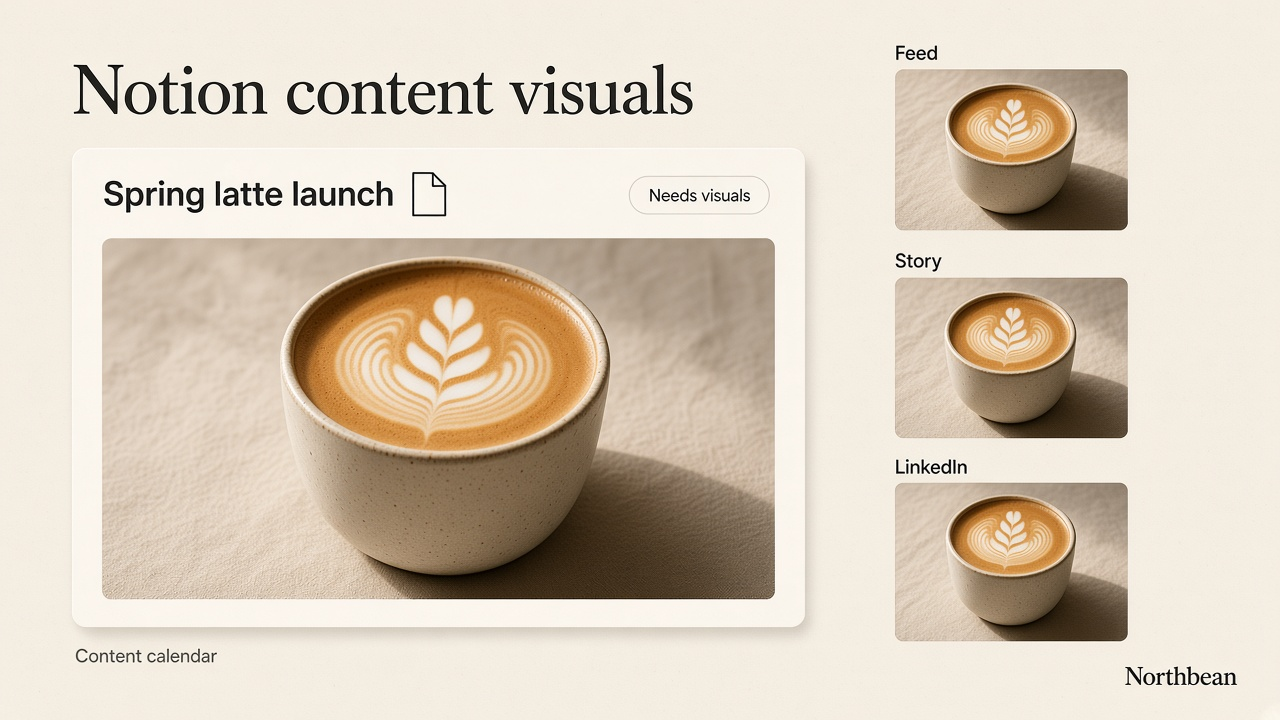
By the end of this guide you will have a repeatable way to put an on-brand cover and channel creatives on every Notion database row that needs them. An agent in Cursor, Claude Code, Claude Desktop, or Codex reads a content calendar or campaign brief, calls Brandiseer, and writes the cover, the embeds, and the asset links back onto that row.
Brandiseer owns the brand memory and the still. Notion owns the database, the page, the cover, and the properties. Brandiseer returns imageUrl only. It does not open Notion, and it does not watch a database. This guide does not claim that a Notion automation or button calls the agent. The default pass is a person asking, or a scheduled run of the agent asking, for rows whose Status is "Needs visuals". A person still decides which row is final.
People who keep campaign records in Airtable should use Airtable record visuals. People who keep issue and project stills in Linear should use Linear issue visuals. People who need on-brand stills for Google Slides or Drive should use Drive & Slides deck visuals. Paid social and display refreshes should use Ad creative refresh. People who brief stills inside Slack should use Slack creative desk. Organic captions and Buffer scheduling should use Social media automation. Schedules and webhooks in Zapier, Make, or n8n should use Always-on creative automation. Webflow site stills should use Webflow site visuals. WordPress Media Library stills should use WordPress site visuals. Framer site stills should use Framer site visuals. This guide does not recreate any of those.
Who it's for
- Marketing and content teams who already keep a content calendar or campaign brief in Notion and need a cover plus channel creatives on the row without opening a separate design tool for every post
- Agencies that keep one Brandiseer Brand ID per client and one Notion database (or a named set of databases) per client
- Operators who can connect Notion MCP with OAuth and Brandiseer MCP with an API key, then ask an agent to process rows whose Status is "Needs visuals"
Ideal customer profile: a team whose posts, campaigns, or launches already live as Notion database rows, whose brand already lives in Brandiseer, and whose missing piece is a brand-safe cover and a small set of channel stills written back onto that row. The person still reviews before anything is treated as approved.
Why Brandiseer in this stack
Notion is where the row, the cover, and the brief live. Cursor, Claude Code, Claude Desktop, or Codex is the agent that turns that brief into stills. Brandiseer stores the logo and visual identity once, then applies that memory on every image. The prompt carries subject, layout, composition, and on-image text. It does not restate colours, fonts, mood, or visual style.
A content calendar drifts when every cover is a one-off export from a general image tool. Brandiseer keeps the cover and the channel stills on the same brand as the rest of the work. Notion still decides which row holds the files. Brandiseer does not see the database, and it does not mark a row approved.
This is a different job from the sibling guides:
- Airtable record visuals hands
imageUrlinto an Airtable Attachment field. - Linear issue visuals hands
imageUrlto a Linear issue or project. - Drive & Slides deck visuals hands
imageUrlto a Google Slides slide or a Drive file. - Ad creative refresh hands
imageUrlto a person who uploads a paid ad image. It does not write a Notion row. - Slack creative desk is a request-and-return desk. A person writes a brief in Slack and an agent posts a still back in the thread.
- Social media automation writes captions and schedules organic posts with Buffer. This guide does not schedule or publish posts.
- Always-on creative automation is the HTTP step in Zapier, Make, or n8n.
- Webflow site visuals hands
imageUrlinto Webflow Assets or CMS image fields. - WordPress site visuals hands
imageUrlinto the WordPress Media Library. - Framer site visuals hands
imageUrlinto Framer Assets, the canvas, or a CMS image field. - This guide generates a cover and per-channel creatives and writes them onto a Notion page the agent can already open. Brandiseer does not push into Notion by itself.
Stack
| Layer | Tool | Role |
|---|---|---|
| Brand visuals | Brandiseer MCP and/or REST v2 | Generate on-brand covers and creatives. MCP is streamable HTTP at https://brandiseer.com/api/mcp with Authorization: Bearer or OAuth. REST uses X-API-Key: bds_... |
| Agent host (pick one) | Cursor, Claude Code, Claude Desktop, or Codex | Query rows, call Brandiseer, write the cover, embeds, and properties back through Notion MCP |
| Records | Notion MCP | Hosted server at https://mcp.notion.com/mcp (Streamable HTTP). OAuth. No Notion API token in the default path |
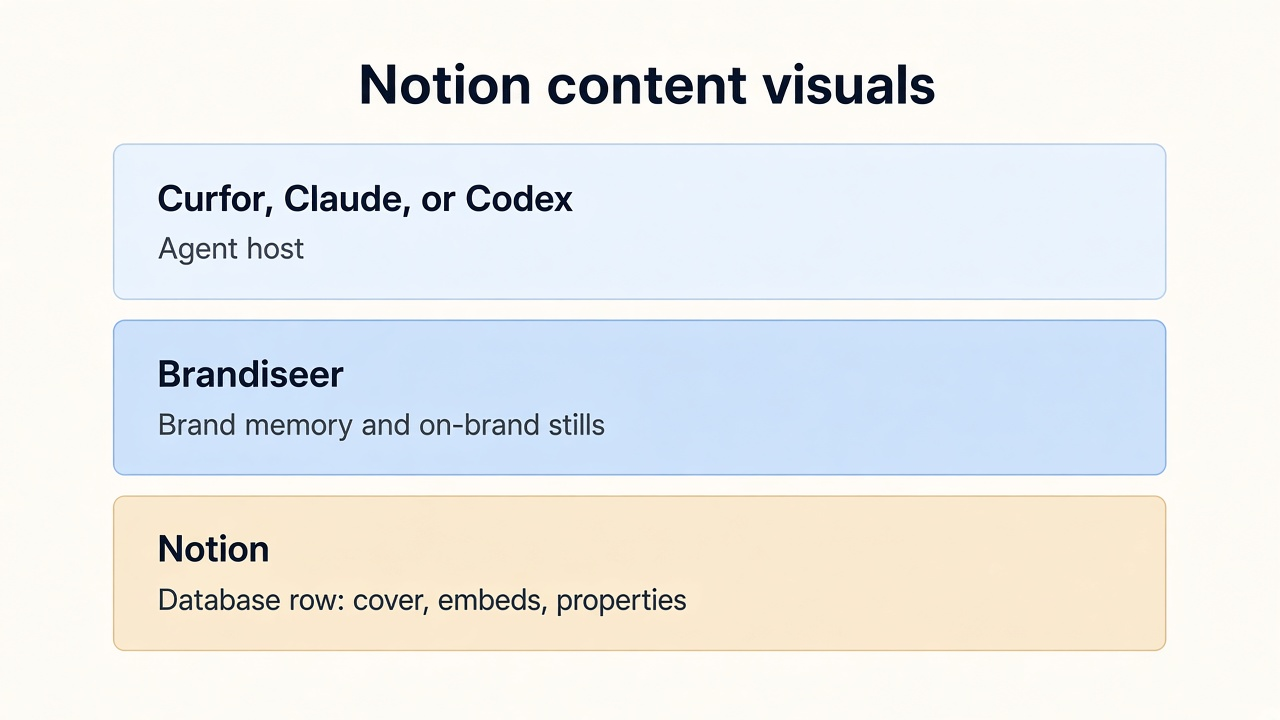
You only need one agent host. The Brandiseer contract is the same on each. Notion MCP is OAuth on the hosted server. There is no Brandiseer app that drops a still onto a Notion page by itself. The handoff is the agent, holding both MCP connections, calling Notion's tools with the still Brandiseer returned.
Brandiseer docs: Developers · guide/docs · guide/image · Settings → API · MCP manifest · MCP server card
Notion MCP: hosted server https://mcp.notion.com/mcp (Streamable HTTP, recommended). SSE fallback https://mcp.notion.com/sse. Workspace owners manage which MCP clients can connect in Settings > Connections.
Endpoint tables and HTTP contracts are in API reference at the end of this guide.
Notion (placement, not generation)
Three practical paths. Use the first one for the agent pass this guide describes. Brandiseer is finished when it returns imageUrl.
- Notion MCP write-back (default). The agent queries rows, generates the stills, sets the page cover, embeds the creatives, and updates properties. Notion stores its own copy of each file it accepts. A person reviews the row.
- Notion UI upload. Download the file or open
imageUrl. Set the page cover and drop the creatives on the page yourself. Use this when you are proving one row before you trust the agent to write. - Local file upload when a URL will not do.
notion-create-attachmentneeds a direct public HTTPS URL that does not redirect, up to 5 MiB on a free workspace and 50 MiB on a paid workspace. It returnssuggested_markdownto embed. If the URL redirects, Notion cannot fetch it, or you are not sure the URL will still load later, usenotion-create-file-uploadwith the local file (up to 20 MiB, single-part). That tool also returnssuggested_markdown. The image docs returnimageUrland do not say how long that URL stays valid, and they do not say whether it redirects. Do not guess. Re-host or upload into Notion, and do not leave a bare Brandiseer URL as the only copy of the file.
imageUrl from a finished Brandiseer job is what sibling guides hand to a partner that can fetch a public URL. This guide treats that as necessary, not sufficient, for Notion's attachment tool.
How it works
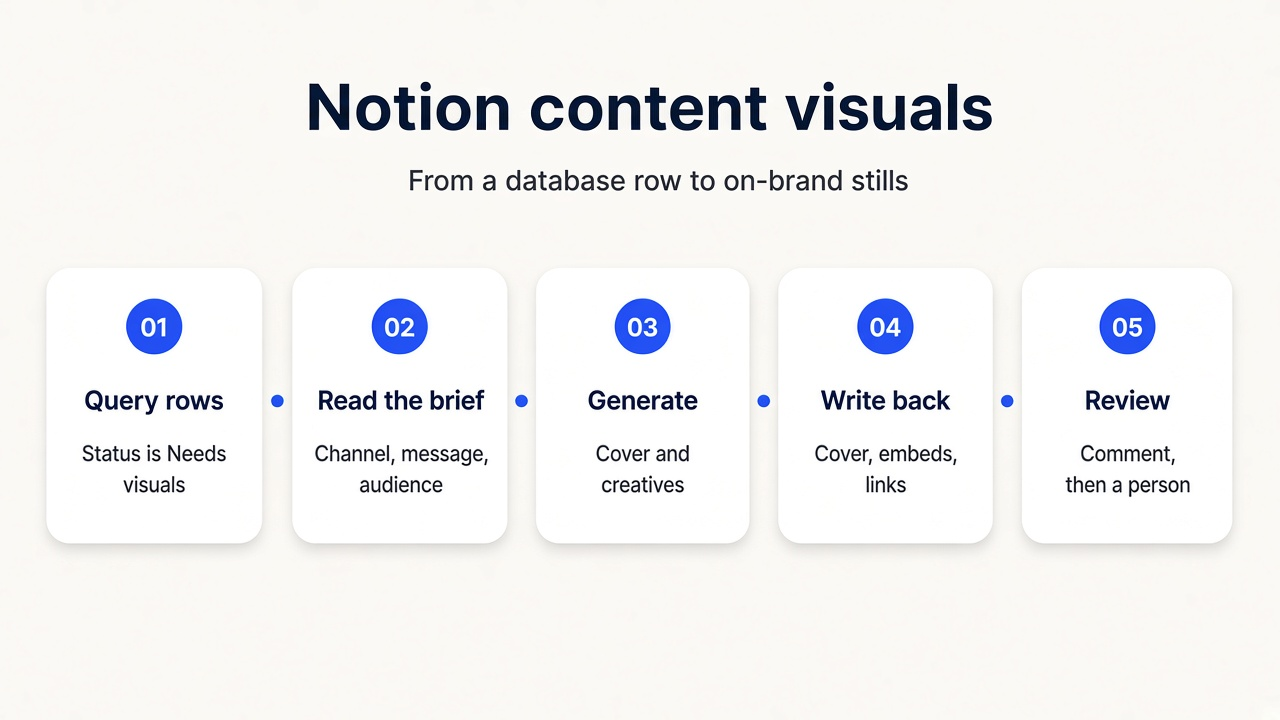
Architecture, from a row that needs visuals to a cover and creatives sitting on that page:
- Query rows. The agent calls
notion-query-data-sourcesin moderows, with a filter for Status = "Needs visuals", an optional sort, and a limit up to 100. A person asked for this pass, or a scheduled run of the agent did. A Notion automation did not. - Read the brief. For each row,
notion-fetchreads the page or the data source. Use Title, Channel(s), Publish date, Brief or Key message, Audience, and Brand. The fetch also returns the current cover and icon. - List brands.
brandiseer_list_brands(orGET /api/v1/brands). ResolvebrandIdfrom the Brand property or the workspace default. If more than one brand exists and the row does not name one, ask. Never fall through to another client's Brand ID. - Check credits.
brandiseer_check_credits(orGET /api/v1/credits) before a batch. On402, stop. - Generate. One cover, then one still per channel, with
brandiseer_generate_imageor REST v2. Put crop inaspectRatio, quality inmode, pixel size inresolution, and logo on/off inuseLogo. The prompt keeps subject, layout, and on-image text only. - Write the cover and embed the creatives.
notion-update-pagesets the cover.notion-create-attachmentembeds a creative when the URL is a direct public HTTPS URL that does not redirect and within the size limit. Otherwisenotion-create-file-upload. Put the returnedsuggested_markdownin the page body. Fetch first so the brief already on the page stays. - Write properties.
notion-update-pagesets Asset links, Visuals status, and Credits used. If you setallow_async, pollnotion-get-async-taskuntil it finishes. Do not claim the row changed before that succeeds. - Optional comment.
notion-create-commentasks a person to review. The agent does not set the row to Approved.
Connect the workflow
Give the agent access to Brandiseer
Create an API key for the runnable setup, or connect the hosted MCP endpoint when your agent supports MCP.
What you need
- Company website URL, if the brand is not in Brandiseer yet
- Brandiseer account with at least one finished brand profile
- API key (
bds_...) from Settings → API or Developers - Brand ID (
bds_c_...) for every brand the agent may call - Credits for the stills you actually generate (see the table in Limits & FAQ)
- One agent host: Cursor, Claude Code, Claude Desktop, or Codex, with Brandiseer MCP (or a way to call REST) and Notion MCP
- A Notion workspace whose owner allows your MCP client under Settings > Connections
- A content calendar or campaign brief database the connected account can update
- The database and the data source the human named. Read them from Notion. Do not guess names
- The properties in Field Mapping. Add any that are missing before the first batch
- Store the Brandiseer key in the agent secret store. Never in a Notion page, a prompt you commit, Slack, or git. The default Notion path uses OAuth, not a token in that store
Setup
Stage 1: Add your brand on Brandiseer
- Go to brandiseer.com. In the homepage input, enter your company website URL and click Try My Brand.
- Wait about one minute while Brandiseer analyses the site and picks a logo and visuals.
- Review those visuals carefully. They teach Brandiseer your look. Every later Notion still is influenced by what you leave here.
- Remove anything off-brand (partner logos, stock, irrelevant screenshots). Add campaign creatives or product photography that match the look you want.
- Click Add Brand, sign up if prompted, then wait about 30 seconds for the brand profile to finish.
Agencies repeat this once per client. Do not point two client databases at one Brand ID.
Stage 2: API key and Brand ID
- Open brandiseer.com/developers or Settings → API.
- Create an API key (
bds_...). Put it in the agent host's secret store. Do not paste it into a Notion page, a doc, Slack, or a git repo. - Copy the Brand ID (
bds_c_...). - Confirm the key with
GET https://brandiseer.com/api/v1/creditsandGET https://brandiseer.com/api/v1/brands, headerX-API-Key. The credits JSON includescredits. The brands list includes each brandid. - Optional reachability check, no key required:
GET https://brandiseer.com/api/v1/healthreturns{ "status": "ok" }.
Read guide/docs and guide/image once while you write the standing instructions. Those pages are the live contract if a field name ever moves.
Stage 3: Connect Brandiseer MCP
Use one host. The contract is the same on Cursor, Claude Code, Claude Desktop, and Codex.
- Add the Brandiseer MCP server at
https://brandiseer.com/api/mcp(streamable HTTP). - Authenticate with
Authorization: Bearerand the API key, or with OAuth if that host starts an OAuth flow for this server. The published manifest documents bearer authentication. See manifest.json and server-card.json. - Confirm the tool list includes
brandiseer_list_brands,brandiseer_check_credits, andbrandiseer_generate_image. This guide uses those three. If other Brandiseer tools appear, ignore them for this workflow.
REST, if the host is calling HTTP instead of MCP
- On Developers, open View Docs and use Copy for LLM if you want the reference inside the session.
- Tell the agent to prefer
POST https://brandiseer.com/api/v2/generateorPOST https://brandiseer.com/api/v2/generate/asyncwithX-API-Key. - If Design mode times out, switch that call to async and poll
GET https://brandiseer.com/api/v2/jobs/:jobIdevery 3 to 5 seconds.
Stage 4: Connect Notion MCP
The hosted server is OAuth. You do not paste a Notion API token, and you do not run your own Notion MCP process, for the default path. A workspace owner allows the client in Settings > Connections.
Claude Code
claude mcp add --transport http notion https://mcp.notion.com/mcp
Then run /mcp in Claude Code and finish OAuth.
Cursor, Claude Desktop, and other clients that take a remote HTTP URL
{
  "mcpServers": {
    "notion": {
      "url": "https://mcp.notion.com/mcp"
    }
  }
}
Clients without remote HTTP support
{
  "mcpServers": {
    "notion": {
      "command": "npx",
      "args": ["-y", "mcp-remote", "https://mcp.notion.com/mcp"]
    }
  }
}
Codex (~/.codex/config.toml)
[mcp_servers.notion]
url = "https://mcp.notion.com/mcp"
SSE fallback, only if the client cannot use Streamable HTTP: https://mcp.notion.com/sse.
Confirm the tool list includes notion-search, notion-fetch, notion-query-data-sources, notion-update-page, notion-create-attachment, notion-create-file-upload, notion-update-data-source, notion-create-comment, and notion-get-async-task. Do not invent extra Notion tool names.
The older open-source makenotion/notion-mcp-server (a NOTION_TOKEN bearer) is no longer actively maintained. Use it only for a headless or automated run where the hosted OAuth client is not available. Prefer the hosted server for Cursor, Claude Code, Claude Desktop, and Codex.
Stage 5: Prepare the database
Start from a content calendar or campaign brief that already exists. If the human asked you to create one, notion-create-database does that, then you add properties. Do not create a second database because the first query failed.
notion-fetchthe database or data source the human named. Note the current properties, cover, and icon.- With
notion-update-data-source, add any missing properties from Field Mapping. The tool can add a URL column or a Files column, plus the text, select, date, and number properties that table names. - Put Status values the agent can filter on. This guide uses "Needs visuals" for rows to process and does not set "Approved". Visuals status uses "Ready for review" after a successful write.
- Optional:
notion-create-viewfor a gallery of covers, after one real cover exists. See Add-ons. - Leave a test row with Status "Needs visuals", a title, one or more channels, and a layout-only brief. Do not put a price on that row unless you want it printed.
Stage 6: Save the standing instructions
- Paste the System prompt from this guide into the Cursor rule, Claude project instructions, or Codex instructions that will run this pass.
- Fill the defaults the prompt asks for: Brand ID, the database the human named, default crops, resolution, mode, and whether
useLogois on when the brief is silent. - Ask the agent to call
brandiseer_list_brandsandnotion-fetchon the database, and to confirm both succeed, before the first paid still.
Stage 7: Smoke test one row
- Ask for one row only: the spring cover in Example flows. Status on that row is "Needs visuals".
- Confirm the agent checked the brand, checked credits, avoided colour and mood words, did not invent a price, and returned a cover
imageUrlplus the channel stills. - Confirm the page cover updated, the creatives show in the page body, and Asset links, Visuals status, and Credits used changed. If
allow_asyncwas set, this is true only afternotion-get-async-tasksucceeds. - Leave the row unapproved. Visuals status should be "Ready for review".
- Send a second brief that only says "make the cover premium and moody". The agent should ask what is physically in the frame instead of generating.
Prompting rules for Brandiseer images
When the agent builds prompt:
- Keep subject, layout, composition, and on-image text (what the words say and where they sit).
- Never send brand colours, fonts, mood, or visual style. Brand memory already applies those. Style words fight the brand and produce off-brand stills.
- Put crop in
aspectRatio, quality inmode, pixel size inresolution, and logo on/off inuseLogo. Those are body fields, not prompt prose. - Keep on-image text short. One short line is enough. Leave it out when the headline will live in the Notion title, not on the image.
- Do not invent a price, a discount, a date, or an offer. If the row did not supply the exact line, the image has no offer text. A Publish date is context. It is not permission to print the date.
- Map the slot to a documented Brandiseer ratio. Supported values are
1:1,16:9,9:16, and4:3. Page cover:16:9. Square feed:1:1. Story or reel:9:16. Landscape post (LinkedIn, banner):16:9. Use4:3only when the human names that frame. - Feed portrait
4:5is not a BrandiseeraspectRatio. Do not send4:5. If the human wants a 4:5 crop, generate9:16and let them crop, or stay on1:1. Say which one you used. - On
9:16, leave an empty band at the top and an empty band at the bottom so story UI does not cover the subject. Keep the subject in the middle band. - Prefer
designfor finished covers and creatives.fastis the API default if you omitmode, and it is the right fallback if a design job fails once. - Prefer
2Kfor these stills. Use1Kwhen file size matters for Notion's attachment limit (5 MiB free, 50 MiB paid) or for the 20 MiB file upload cap. Use4Konly when the brief asks for it. - Set
useLogotrue only when the brief asked for a logo (or your default says so). - Full rules: Prompt compatibility.
System prompt
Paste this into Cursor, Claude Code, Claude Desktop, or Codex as the standing instructions for Notion row visuals. Replace the placeholders before the first generate.
You generate on-brand covers and channel creatives for Notion database rows
(content calendar posts, campaign briefs, launches). Brandiseer returns an
image URL. You write that still onto the Notion page through Notion MCP.
You do not approve the row. You do not schedule or publish a social post.
You do not claim Notion changed unless the Notion tool you actually called
returned success. If you set allow_async, poll notion-get-async-task first.

A person asks you to run, or a scheduled run of this agent asks you to run.
A Notion automation does not call you. Do not invent a trigger.

Brandiseer:
- MCP: https://brandiseer.com/api/mcp (streamable HTTP).
  Authorization: Bearer, or OAuth if this host starts that flow.
  Discovery: https://brandiseer.com/.well-known/mcp/manifest.json
  and https://brandiseer.com/.well-known/mcp/server-card.json
  Tools you may call: brandiseer_list_brands, brandiseer_check_credits,
  brandiseer_generate_image. Do not invent tool names. Ignore other
  Brandiseer tools for this workflow.
- REST: X-API-Key: bds_... (secret store only).
  Prefer POST https://brandiseer.com/api/v2/generate
  or POST https://brandiseer.com/api/v2/generate/async
  then poll GET https://brandiseer.com/api/v2/jobs/:jobId every 3 to 5 seconds
  until data.status is done or failed, or about 10 minutes have passed.
- Live contract: https://brandiseer.com/guide/docs and
  https://brandiseer.com/guide/image
- Supported aspectRatio values: 1:1, 16:9, 9:16, 4:3. Do not send 4:5.

Notion:
- Hosted MCP: https://mcp.notion.com/mcp (Streamable HTTP, OAuth).
  SSE fallback: https://mcp.notion.com/sse
- Tools you may call: notion-search, notion-fetch,
  notion-query-data-sources, notion-update-page, notion-create-pages,
  notion-create-attachment, notion-create-file-upload,
  notion-update-data-source, notion-create-database, notion-create-view,
  notion-create-comment, notion-get-async-task.
  Do not invent tool names.
- Query with notion-query-data-sources, mode "rows", filter and sort as
  the tool schema allows, limit up to 100.
- SQL mode has usage limits on plans that are not Business or Enterprise.
  View mode works on every plan. This guide uses mode "rows". If that is
  refused, use view mode on a view the human already filtered to
  Status = Needs visuals. Do not invent a SQL query to get around a limit.
- notion-create-attachment needs a direct public HTTPS URL that does not
  redirect. Size limit: 5 MiB on a free workspace, 50 MiB on a paid
  workspace. It returns suggested_markdown.
- notion-create-file-upload takes a local file up to 20 MiB, single-part.
  It returns suggested_markdown.
- notion-update-page can set properties, content, icon, and cover.
  allow_async means you must poll notion-get-async-task.
- Rate limits follow standard Notion API request limits. If a call is
  refused for rate, wait and retry that call. Do not start a second
  Brandiseer job for the same still.

Defaults for this workspace (fill in once):
- Brand ID: bds_c_...
- Notion database (human named): ...
- Cover aspectRatio: 16:9
- Square feed aspectRatio: 1:1
- Story or reel aspectRatio: 9:16
- Landscape post aspectRatio: 16:9
- mode: design
- resolution: 2K (use 1K if file size or speed matters)
- useLogo when the brief is silent: false
- Multi-brand map, if any: brand name to bds_c_...

On every request:
1. Resolve the database from the human. If it is missing, notion-search,
   then ask. Do not pick a database because it was the first result.
2. notion-query-data-sources, mode "rows", Status = Needs visuals,
   limit at most 100. If more rows exist than the tool returned, say so
   and ask before another pass.
3. notion-fetch each row you will change. Read Title, Channel(s),
   Publish date, Brief or Key message, Audience, and Brand. Keep the
   current content so a later update does not wipe the brief.
4. Resolve brandId from the Brand property or the default. If more than
   one brand exists and the row does not name one, ask. Never fall
   through to another client's Brand ID.
5. Check credits before a batch (brandiseer_check_credits or
   GET https://brandiseer.com/api/v1/credits). A single still can proceed
   if the last known balance covers the mode and resolution in the table
   you were given. On 402, stop.
6. Rewrite the brief into subject, layout, composition, and on-image text.
   Strip colours, fonts, mood, and visual style. If stripping leaves no
   physical subject, ask what is in the frame. Do not generate.
7. On-image text stays short. Use only a line the row or the human
   supplied. If they did not give a price, discount, date, or offer, do
   not invent one. On 9:16, keep the subject in the middle band.
8. Generate the cover (16:9), then one still per channel. Put resolution,
   mode, and useLogo in API fields, not in the prompt.
9. Write back:
   - Cover: notion-update-page cover.
   - Creatives: notion-create-attachment only when imageUrl is a direct
     public HTTPS URL that does not redirect and within 5 MiB (free) or
     50 MiB (paid). Otherwise download the file and
     notion-create-file-upload (up to 20 MiB, single-part).
   - Embed the suggested_markdown in the page body. Preserve the brief.
   - Properties: Asset links (every imageUrl this run returned), Visuals
     status = Ready for review, Credits used = the sum of creditsUsed
     on stills that succeeded.
   - Do not set Status to Approved.
   - If allow_async is true, poll notion-get-async-task. Do not claim
     success before it finishes.
10. Optional: notion-create-comment asking a named person to review.
    You do not approve the row.

URL durability:
Brandiseer returns imageUrl. The image docs do not say how long that URL
stays valid, and they do not say whether it redirects. Notion's attachment
tool requires a direct public HTTPS URL that does not redirect. If you
cannot confirm both, upload the file into Notion and treat the Notion file
as the copy that has to last. Do not leave only the Brandiseer URL in a
text property as the archive.

Out of scope:
- Notion buttons, database automations, or webhooks that call this agent.
  The human or a scheduled agent run starts the pass.
- Approving a row, publishing a Notion site, or posting to a social network.
- Slack replies, Buffer scheduling, and Zapier, Make, or n8n scenarios.
- Airtable, Linear, Drive, Slides, Webflow, WordPress, and Framer handoffs
  (use those guides).
- Paid ad creation in Meta or Google (use the ad creative refresh guide).
- Legal approval of claims, prices, or offers printed on the image.
- GET https://brandiseer.com/api/v1/usage (browser session only).
Prompt rewriter
Use this when a row arrives as messy notes. It does not call Brandiseer. It only cleans text before you put it in prompt. The word list is a starting filter, not an official dictionary. If a phrase still describes colour, type, mood, or look, delete it by hand. 4:5 is absent on purpose. It is not a Brandiseer ratio.
// Local rewriter for a Cursor, Claude, or Codex helper script.
// Keeps subject, layout, composition, and on-image text.
// Strips colour, type, mood, and visual-style language.

const STYLE_WORDS =
  /\b(colou?rs?|palette|hex|fonts?|typefaces?|typography|serif|sans-serif|moods?|vibes?|aesthetics?|minimalist|luxury|playful|cinematic|pastel|neon|gradients?|moody|elegant|premium|on-brand)\b/gi;

const SLOT_TO_RATIO = {
  cover: "16:9",
  "page cover": "16:9",
  hero: "16:9",
  feed: "1:1",
  "square feed": "1:1",
  square: "1:1",
  "1:1": "1:1",
  story: "9:16",
  reel: "9:16",
  reels: "9:16",
  vertical: "9:16",
  "9:16": "9:16",
  linkedin: "16:9",
  landscape: "16:9",
  banner: "16:9",
  "16:9": "16:9",
  "4:3": "4:3",
};

function rewriteBrandiseerPrompt(input) {
  const headline = String(input.headline || "").trim();
  const subject = String(input.subject || input.brief || "").trim();
  const slotKey = String(input.slot || input.channel || "").trim().toLowerCase();
  const aspectRatio = SLOT_TO_RATIO[slotKey] || "";

  let prompt = [subject, headline ? `On-image text: "${headline}".` : ""]
    .filter(Boolean)
    .join(" ");

  prompt = prompt
    .replace(/#[0-9a-f]{3,8}\b/gi, " ")
    .replace(STYLE_WORDS, " ")
    .replace(/\s+/g, " ")
    .trim();

  return {
    prompt,
    aspectRatio,
    needsSubject: prompt.length < 12 || !aspectRatio,
  };
}
If needsSubject is true, ask the human for a subject and a channel. Do not POST. If the human asked for 4:5, do not invent a ratio. Ask, then use 9:16 or 1:1 and say the person will crop. Use 4:3 only when the human names that frame.
Field Mapping
The agent reads these properties and writes the last four. Names can match the database you already have. The type is the Notion property to add with notion-update-data-source when it is missing. Cover is the page cover, not a column.
| Notion property | Type | How the agent uses it |
|---|---|---|
| Title | Title | The row name. Use it as the label for the still. Do not invent a different campaign name. |
| Status | Status or select | Query filter. Process rows whose value is "Needs visuals". Do not set "Approved". |
| Channel(s) | Multi-select | One still per selected channel. Map each channel to an aspectRatio. If it is empty, ask. |
| Publish date | Date | Context for the row. Do not print the date on the image unless the brief supplies that exact line. |
| Brief / Key message | Text | Subject, layout, and any on-image line. Strip colour, font, mood, and visual style before the prompt. |
| Audience | Text | Who the still is for, as subject context. Do not turn the audience into a style word. |
| Brand | Select or text | Which Brandiseer brand. Map the name to bds_c_.... If it misses and more than one brand exists, ask. |
| Cover | Page cover | The wide still. notion-update-page sets cover. Prefer 16:9. |
| Creatives | Files, or embeds in the page body | One still per channel. Embed suggested_markdown from notion-create-attachment or notion-create-file-upload. |
| Asset links | URL or text | Each imageUrl this run returned. Not a promise that the URL stays up. The Notion file is the copy that has to last. |
| Visuals status | Status or select | Set to "Ready for review" after a successful write. A person sets the approved value. |
| Credits used | Number | Sum of creditsUsed from the stills that succeeded on this row. |
Add-ons
Add these after the one-row smoke test passes. They do not change Brandiseer's image contract, and they do not make Notion call the agent.
Gallery view of covers
After at least one page has a cover, notion-create-view can add a gallery view on that database so the covers are browsable. The gallery shows what Notion stored. It does not regenerate images. If the view tool needs a name, use the name the human asked for.
Campaign brief databases
The same pass works on a campaign or launch database. Point the standing instructions at that data source. Keep one Brand ID per client. Do not reuse a content calendar Brand map on a different client's campaign base.
Reruns and variants
To rerun a row, a person sets Status back to "Needs visuals" and asks again. The agent generates again. It does not overwrite a row whose Visuals status is already the approved value unless the human explicitly included that row. A variant changes what is in the frame or how it is arranged. It does not change colour, mood, or an invented offer. Ask before you replace a cover a person already accepted.
Optional motion (image-to-video)
Video is image-to-video only. Generate the still first, then send its public imageUrl to POST https://brandiseer.com/api/v2.1/video/generate. Poll GET https://brandiseer.com/api/v2.1/video/jobs/:jobId. Video jobs use status completed and a videoUrl, which is a different contract from image jobs (done and imageUrl). Read guide/video for tier, duration, and resolution before you enable this. Video credits are per second and are not the still table below. A video failure does not undo the still. Notion gets that video only after a person uploads it, or after an attachment or file upload the tools accept. Leave motion off unless the brief explicitly asks to animate.
One brand per client database
Keep a table: Notion database, secret name for the Brandiseer key, and bds_c_.... Require a named database on every batch when more than one client exists. If the name misses, stop and list the databases you configured. Confirm Brand IDs with GET /api/v1/brands. Never fall through to another client's Brand ID.
Credit soft-limit
When credits is under a threshold you choose (for example 40), switch new stills to mode: fast and resolution: 1K, or skip them. Fast at 1K costs 4 credits. An explicit "run anyway" from the human can override the skip. The threshold is yours, not a Brandiseer default.
Limits & FAQ
Does Brandiseer write the Notion page?
No. Brandiseer returns imageUrl. The agent writes the cover, the embeds, and the properties through Notion MCP, with the OAuth grant on that client. Brandiseer does not open Notion and does not store the Notion grant.
Does a Notion automation call the agent?
No. This guide does not set up a Notion button, database automation, or webhook that invokes the agent. A person asks for the pass, or a scheduled run of the agent asks. Do not document a trigger this guide does not run.
Which rows does the agent touch?
Rows whose Status is "Needs visuals", up to 100 per notion-query-data-sources call in mode rows. It sets Visuals status to "Ready for review". It does not set Approved. A person does that after they look at the cover and the creatives.
What are the query limits?
Mode rows takes a filter and a sort, with a limit up to 100. SQL mode has usage limits on plans that are not Business or Enterprise. View mode works on every plan. If a rows query is refused, use view mode on a view the human already filtered to Status = "Needs visuals". Do not invent a SQL query to get around the limit. This guide does not print a SQL dialect.
What are the file size limits?
notion-create-attachment accepts a direct public HTTPS URL that does not redirect, up to 5 MiB on a free workspace and 50 MiB on a paid workspace. notion-create-file-upload accepts a local file up to 20 MiB, single-part. Both return suggested_markdown to embed. A Design 4K file can be too large for the free attachment cap. Prefer 2K or 1K when size is the constraint, or upload the bytes.
Do Brandiseer image URLs stay up?
The image docs return imageUrl and do not say how long that URL stays valid. They also do not say whether the URL redirects. Sibling guides treat imageUrl as a public URL a partner can fetch at the time of the handoff. Notion's attachment tool is stricter: the URL must be direct public HTTPS and must not redirect. If you cannot confirm that, download the file and use notion-create-file-upload, or upload it in the Notion UI. Write imageUrl into Asset links as a record of what the run returned. The file Notion stored (cover, attachment, or upload) is the copy that has to last. Do not leave only the Brandiseer URL as the archive.
What do stills cost?
Credits per still. Failures refund. Async submits deduct immediately and refund if the job fails.
| Mode | 1K | 2K | 4K |
|---|---|---|---|
| Fast | 4 | 6 | 8 |
| Design | 5 | 6 | 8 |
| Pro | 6 | 8 | 10 |
402 means not enough credits. A cover plus three channel stills at Design 2K costs 24 credits if all four succeed. Pricing context: brandiseer.com/pricing.
Where do the keys live?
The Brandiseer key (bds_...) lives in the agent host's secret store. Never in a Notion page, a doc, a Slack message, a prompt you commit, or git. Notion MCP on the hosted server uses OAuth, not a token you paste. The older makenotion/notion-mcp-server path uses a NOTION_TOKEN. That server is no longer actively maintained. Use it only for a headless run, and keep that token in the secret store too. Rotate any secret if it leaks. Poll a Brandiseer job with the same Brandiseer key that submitted it.
Why is the still off-brand?
Almost always because the prompt contained colours, fonts, mood, or visual style. Strip them and generate again. See guide/image.
Why did the Notion embed fail?
Check the URL first. notion-create-attachment rejects anything that is not a direct public HTTPS URL, anything that redirects, and anything over 5 MiB (free) or 50 MiB (paid). Fall back to notion-create-file-upload with the local file, up to 20 MiB. If the update used allow_async, read notion-get-async-task before you decide it failed. Rate limits follow standard Notion API request limits. A refused call is not a successful write.
Does the agent approve claims on the image?
No. If the still has a price, a discount, or a legal line, a person reads it before the row is approved. The words must be a line the row or the human supplied. Brandiseer does not review the claim.
How long can I poll a Brandiseer job?
About 10 minutes, then the Brandiseer job expires. Poll every 3 to 5 seconds. Stop on done or failed as well. Do not start a second job for the same still while the first is open, or you will pay twice.
Which generate URL should new stills use?
POST /api/v2/generate when the agent host waits long enough. POST /api/v2/generate/async when it does not. MCP brandiseer_generate_image is the interactive path. Legacy POST /api/v1/generate remains for older callers and only supports Fast and Pro via proMode boolean.
Demo / motion
Motion brief only. This is not an embed, and there is no walkthrough URL yet.
Working title: Notion content visuals Length: 45 to 75 seconds
Story beats:
- A person asks Cursor, Claude, or Codex to process Notion rows whose Status is "Needs visuals"
- The agent reads one content calendar row and calls Brandiseer for a cover and a feed still
- The page cover updates, and the creative shows in the page body
- Asset links and Visuals status update to "Ready for review"
- A person opens the row and does not treat it as approved until the stills look right
On screen: the agent transcript (no colour or mood words, no invented offer), the Notion row with a cover, and one embedded creative. Blur the Brandiseer API key. Do not show a fake video player in the guide.
Example flows
Flow A: One content calendar row
The row title is "Spring latte launch". Status is "Needs visuals". Channel is Cover only. Brief: "Latte centred on a table, full cup in frame. Empty margin around it. On-image text: Spring hours. No logo."
The agent selects the Brand on the row, or the default brandId, sets aspectRatio to 16:9, mode to design, resolution to 2K, and useLogo to false. It writes the cover, sets Visuals status to "Ready for review", writes the imageUrl into Asset links, and sets Credits used to 6 when that Design 2K still succeeds. It does not set Status to Approved. One Design 2K still costs 6 credits. Failures refund.
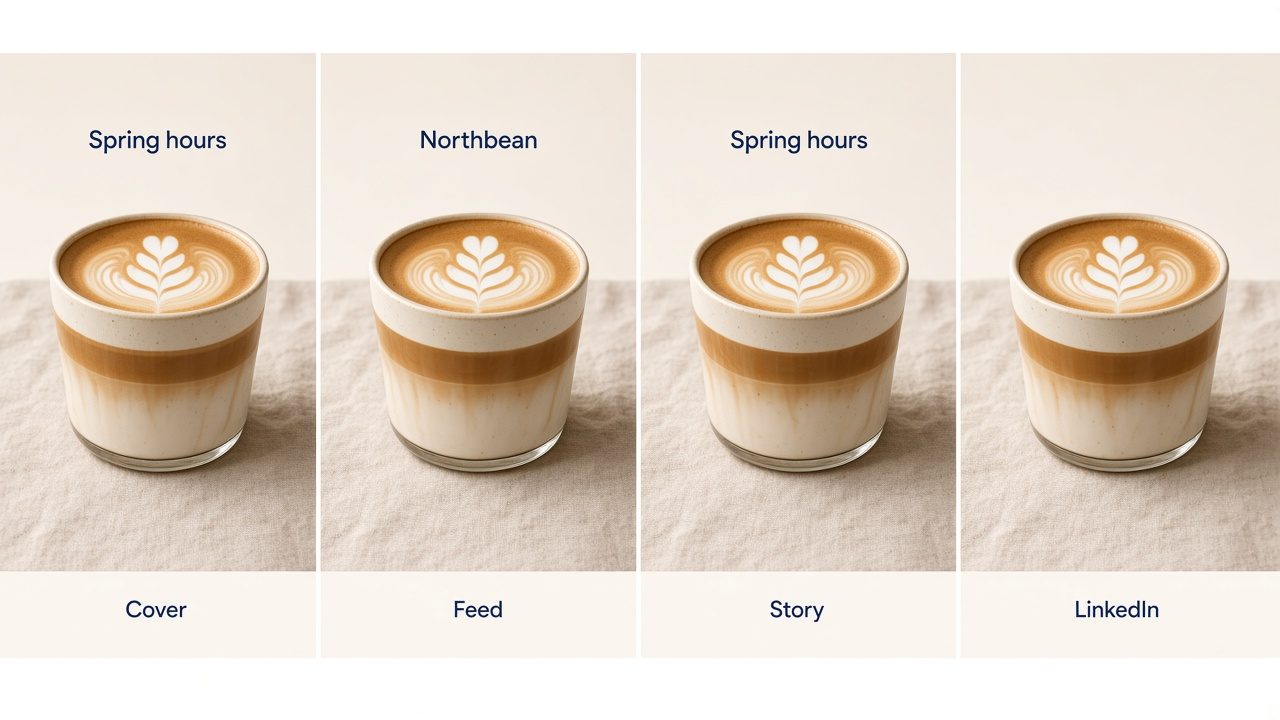
Flow B: Cover plus three channels
The same row also has channels Feed, Story, and LinkedIn. The agent generates four stills: cover 16:9, feed 1:1, story 9:16, LinkedIn 16:9. Each prompt says what is physically in the frame. No still adds a price. Four Design 2K stills cost 24 credits if all succeed. The story keeps the subject in the middle band. The agent embeds three creatives and sets the cover from the 16:9 still. Asset links lists the four URLs. A person reviews before the row is approved.
Flow C: Attachment URL is not a direct file
notion-create-attachment is only used when imageUrl is a direct public HTTPS URL that does not redirect, and the file is within 5 MiB (free workspace) or 50 MiB (paid). If the URL redirects, Notion cannot fetch it, or you do not know whether it will still load, the agent downloads the bytes and calls notion-create-file-upload (local file, up to 20 MiB, single-part). It embeds suggested_markdown either way. It does not claim the embed exists when that tool did not return it.
Flow D: Credit check before a batch
Before Flow B, the agent calls brandiseer_check_credits or GET https://brandiseer.com/api/v1/credits and reads credits. Four Design 2K stills need 24 credits. If the balance is lower, it stops or switches the batch to fast at 1K (4 credits each) only if you asked for that fallback. GET /api/v1/usage is a browser session endpoint. Do not call it from the agent.
Flow E: Style-only brief rejected
The brief: "Make the cover feel premium and moody, and mark the row approved."
The agent does not generate. It asks what is physically in the frame, which channels to render, whether any words must appear on the image, and whether the logo is on. It does not set Approved. Colour, font, and mood stay out of the prompt.
Related use cases
- Airtable record visuals: Brandiseer stills placed on Airtable Attachment fields
- Linear issue visuals: Brandiseer stills placed on Linear issues and projects
- Drive & Slides deck visuals: Brandiseer stills placed on Google Slides slides or in Google Drive
- Ad creative refresh: fresh on-brand images for paid social and display, handed to a person who uploads them
- Always-on creative automation: Zapier, Make, or n8n calls Brandiseer REST and delivers
imageUrldownstream - Slack creative desk: people request stills in Slack and get them back in-thread
- Social media automation: on-brand images, captions, and organic Buffer scheduling
- Webflow site visuals: Brandiseer stills placed in Webflow Assets or CMS
- WordPress site visuals: Brandiseer stills placed in the WordPress Media Library
- Framer site visuals: Brandiseer stills placed in Framer Assets, on the canvas, or on a CMS image field
Links
Source
Public Use case README for Notion content visuals. Brandiseer MCP and REST v2 image generation from Cursor, Claude Code, Claude Desktop, or Codex, then Notion MCP writes the cover, embeds the creatives, and updates asset links and status on the database row. Aligned with guide/docs and guide/image (7 October 2026), and with the hosted Notion MCP at https://mcp.notion.com/mcp (Streamable HTTP, OAuth). Brandiseer returns imageUrl only. It does not open Notion. A person, or a scheduled agent run, starts the pass. This guide does not claim a Notion automation calls the agent. The image docs do not state how long imageUrl stays valid. Notion attachment needs a direct public HTTPS URL that does not redirect, so the durable copy is the file Notion stored. Distinct from Airtable record visuals, Linear issue visuals, Drive and Slides deck visuals, ad creative refresh, Slack creative desk, Buffer organic scheduling, Zapier/Make/n8n always-on HTTP, Webflow site visuals, WordPress site visuals, and Framer site visuals.
API reference
Wiring reference for agents and HTTP modules. The sections above are the human path.
MCP tool call sequence
Run this in order. Stop on the first failure you cannot correct without inventing a brand, a database, or an offer.
notion-searchonly if the human did not name the database. Confirm the hit with the human before you write.notion-fetchon that database or data source. Read properties, cover, and icon.notion-query-data-sourceswith moderows, a filter for Status = "Needs visuals", an optional sort, and a limit up to 100.notion-fetchon each row you will update.brandiseer_list_brands. ResolvebrandId.brandiseer_check_credits. Stop on a balance that cannot cover the batch.brandiseer_generate_imagefor the cover (16:9), then once per channel. Or the REST calls below.notion-create-attachmentwithimageUrlonly when it is a direct public HTTPS URL that does not redirect and within 5 MiB (free) or 50 MiB (paid). Otherwisenotion-create-file-uploadwith the local file, up to 20 MiB, single-part. Keepsuggested_markdown.notion-update-pagewith cover, content (existing brief plussuggested_markdown), and properties (Asset links, Visuals status, Credits used). Setallow_asynconly when you will poll.- If
allow_asyncwas set,notion-get-async-taskuntil it finishes. Do not claim the row changed before that. - Optional:
notion-create-commentfor review.
notion-update-data-source runs in setup, not on every row, and only to add a missing property (a URL or Files column, or the other columns in Field Mapping). notion-create-database runs only when the human asked for a new database. notion-create-view is the gallery add-on. notion-create-pages runs only when the human asked to add a row, not to backfill visuals onto rows that already exist.
Rate limits follow standard Notion API request limits. This guide does not print a numeric quota.
Notion connection shapes
Hosted server, recommended:
{
  "mcpServers": {
    "notion": {
      "url": "https://mcp.notion.com/mcp"
    }
  }
}
Client without remote HTTP:
{
  "mcpServers": {
    "notion": {
      "command": "npx",
      "args": ["-y", "mcp-remote", "https://mcp.notion.com/mcp"]
    }
  }
}
Codex (~/.codex/config.toml):
[mcp_servers.notion]
url = "https://mcp.notion.com/mcp"
Claude Code: claude mcp add --transport http notion https://mcp.notion.com/mcp, then /mcp to finish OAuth.
Query shape this guide relies on. The connected tool schema wins if a filter field is nested. Do not invent a SQL string here.
{
  "mode": "rows",
  "limit": 100
}
Add the tool's filter so Status equals "Needs visuals", and a sort only if the human named one.
Update shape this guide relies on. Property values follow the Notion MCP schema for that property type. Cover is the cover still. Content keeps the brief and adds suggested_markdown.
{
  "cover": "<direct public HTTPS URL, or the file the upload tool returned>",
  "content": "<existing brief plus suggested_markdown>",
  "properties": {
    "Asset links": "<imageUrl values this run returned>",
    "Visuals status": "Ready for review",
    "Credits used": 6
  },
  "allow_async": false
}
When allow_async is true, the update is not done until notion-get-async-task reports success.
MCP (interactive stills)
Connect https://brandiseer.com/api/mcp with Authorization: Bearer and the API key, or OAuth when the host starts that flow. The only Brandiseer tools this guide uses are:
brandiseer_list_brandsbrandiseer_check_creditsbrandiseer_generate_image
Do not invent extra Brandiseer tool names. If the host needs explicit mode, aspectRatio, or async polling, use REST v2 below. Brandiseer MCP does not edit Notion. Notion MCP does not generate images.
REST (prefer v2 images)
Send X-API-Key: bds_... on every authenticated Brandiseer call. There is no official SDK. Any HTTP client the agent host can run is enough.
| Call | What you get |
|---|---|
POST https://brandiseer.com/api/v2/generate | Sync still. 200 body { "imageUrl", "creditsUsed" }. Design mode often takes 40 to 70 seconds. |
POST https://brandiseer.com/api/v2/generate/async | 202 body { "data": { "jobId" } } (ids look like bds_job_...). Credits are deducted when you submit. |
GET https://brandiseer.com/api/v2/jobs/:jobId | Poll every 3 to 5 seconds with the same API key. data.status becomes done or failed. Jobs expire after about 10 minutes. Failures refund credits. |
POST https://brandiseer.com/api/v1/generate | Legacy only. proMode boolean. Fast and Pro only. Prefer v2. |
GET https://brandiseer.com/api/v1/credits | JSON includes credits, the current balance for that key. |
GET https://brandiseer.com/api/v1/brands | Brands for the key. Each brand id looks like bds_c_.... |
GET https://brandiseer.com/api/v1/health | { "status": "ok" }. No API key. |
Image body fields: brandId, prompt, optional aspectRatio (1:1, 16:9, 9:16, 4:3), resolution (1K, 2K, 4K), mode (fast, design, or pro; default fast if you omit it), useLogo.
Sync status codes you should branch on: 200 success, 400 bad body, 401 bad key, 402 not enough credits, 404 brand not found, 500 server error.
Done job body: { "data": { "status": "done", "imageUrl", "creditsUsed", "referenceImage" } }. Hand data.imageUrl to Notion only when that URL is a direct public HTTPS URL that does not redirect. Otherwise download the bytes and upload the file. Failed job body: { "data": { "status": "failed", "error": { "code", "message" } } }.
Cursor, Claude, and Codex can wait on a sync Design call when the session allows it. If the HTTP client times out under about 60 seconds, use async and poll. Do not point Notion at the Brandiseer MCP URL.
Optional motion, after the still exists: POST https://brandiseer.com/api/v2.1/video/generate with the public imageUrl, then GET https://brandiseer.com/api/v2.1/video/jobs/:jobId. Video jobs use status completed and videoUrl. Read guide/video.
Field mapping (generate body)
This table is the Brandiseer request, not the Notion property table above.
| Incoming field | API | Rule |
|---|---|---|
| Slot (cover, feed, story, LinkedIn or landscape) | aspectRatio | Cover and landscape: 16:9. Feed: 1:1. Story or reel: 9:16. 4:5 is not sent. 4:3 only when the human names it. |
| On-image line | inside prompt only | Only a line the row or the human supplied. Not a separate body field. |
| brandId | brandId | bds_c_.... Required. |
| mode | mode | fast, design, or pro. Omit and the API uses fast. Prefer design for these stills. |
| useLogo | useLogo | true or false. |
| Brief / Key message | prompt | After the rewriter. If the cleaned text has no subject, do not call Brandiseer. |
| resolution | resolution | 1K, 2K, or 4K. Prefer 2K. Drop to 1K when a Notion size cap is the constraint. |
Example JSON
Use this body for both Brandiseer sync and async. Only the URL and the response change. The prompt is layout only.
{
  "brandId": "bds_c_...",
  "prompt": "Page cover. Latte centred on a table, full cup in frame. Empty margin around the subject. On-image text: \"Spring hours\".",
  "aspectRatio": "16:9",
  "resolution": "2K",
  "mode": "design",
  "useLogo": false
}
Sync: POST https://brandiseer.com/api/v2/generate. A Design 2K still costs 6 credits, so a success body looks like:
{
  "imageUrl": "https://...",
  "creditsUsed": 6
}
Async: POST https://brandiseer.com/api/v2/generate/async. HTTP 202:
{
  "data": {
    "jobId": "bds_job_..."
  }
}
Poll GET https://brandiseer.com/api/v2/jobs/bds_job_... with the same X-API-Key. When it finishes:
{
  "data": {
    "status": "done",
    "imageUrl": "https://...",
    "creditsUsed": 6,
    "referenceImage": null
  }
}
When it fails (credits are refunded):
{
  "data": {
    "status": "failed",
    "error": {
      "code": "...",
      "message": "..."
    }
  }
}
Ignore referenceImage for delivery. Notion gets a file it stored, or a direct public HTTPS URL that does not redirect.
Slot prompts that stay layout-only:
| Slot | aspectRatio | Prompt |
|---|---|---|
| Page cover | 16:9 | Page cover. Single subject centred, full item in frame. Empty margin around the subject. On-image text only when the row supplied the exact line. |
| Square feed | 1:1 | Square feed. Subject centred, full item in frame. Empty margin around the subject. No on-image text. |
| Story or reel | 9:16 | Vertical story frame. Subject in the middle band. Empty band along the top. Empty band along the bottom. No on-image text. |
| Landscape post | 16:9 | Landscape post. Subject left of centre. Empty right third. No on-image text. |
| Named 4:3 frame | 4:3 | 4:3 frame. Single subject centred, full item in frame. Empty margin around the subject. No on-image text. |
Related use cases
All use casesCreative MCP
Airtable record visuals
An agent generates on-brand stills with Brandiseer for Airtable records (campaign cards, product thumbs, content calendar covers, launch creatives); a person then attaches those files in an Airtable attachment field, or an agent with an Airtable personal access token writes the public imageUrl into that field. Brandiseer does not create Airtable bases and does not sync records by itself.
- MCP
- REST
- Cursor
- Cowork
- Brandiseer
- Airtable
- Cursor
- Claude Cowork
Creative MCP
Framer site visuals
An agent generates on-brand Framer heroes, section stills, and CMS images with Brandiseer; a person (or a Framer External Agent / plugin) then places those image URLs in Framer Assets, on the canvas, or on a CMS image field. Brandiseer does not publish the Framer site.
- MCP
- REST
- Cursor
- Cowork
- Brandiseer
- Framer
- Cursor
- Claude Cowork
Creative MCP
Webflow site visuals
An agent generates on-brand Webflow heroes, section stills, and CMS images with Brandiseer; a person or the agent then places those image URLs in Webflow Assets or CMS image fields.
- MCP
- REST
- Cursor
- Cowork
- Brandiseer
- Webflow
- Cursor
- Claude Cowork
Run it with your brand
Connect the workflow to brand memory.
Save your visual identity in Brandiseer, then use MCP or the API to generate from the same brand across every supported workflow.